LLaMA.cpp
LLaMA.cpp is an open source inference engine written in C/C++ that enables Large Language Models (LLMs) to run efficiently on local hardware. It is designed to minimize dependencies while maximizing performance, allowing users to run models on CPUs, Apple Silicon, NVIDIA GPUs, AMD GPUs, and Intel GPUs.
Unlike frameworks built on Python and PyTorch, llama.cpp focuses on lightweight deployment and efficient execution, making it ideal for local AI assistants and edge computing.
The GGML Ecosystem
ggml is the lightweight tensor library that powers multiple AI inference projects.
The ecosystem includes:
- ggml: Lightweight tensor and machine learning library.
- whisper.cpp: Speech-to-text inference engine.
- llama.cpp: Large language model inference engine.
- llama.vim, llama.vscode, and llama.qtcreator: IDE integrations.
- LlamaBarn and llama CLI: Applications built on top of llama.cpp.
LLaMA.cpp Workflow
The inference workflow begins with a pretrained model downloaded from Hugging Face.
The workflow consists of four major steps:
- Download the pretrained model.
- Convert the model into GGUF format.
- Optionally quantize the weights.
- Run inference using llama.cpp.
SIMD Optimization
One of the reasons llama.cpp performs exceptionally well on CPUs is its extensive use of SIMD (Single Instruction Multiple Data) instructions.
Without SIMD, the CPU performs multiplication one element at a time:
a1 × b1
a2 × b2
a3 × b3
a4 × b4
SIMD processes multiple values simultaneously:
[a1 a2 a3 a4]
×
[b1 b2 b3 b4]
────────────────
[c1 c2 c3 c4]
llama.cpp automatically detects CPU instruction sets such as:
- AVX2
- AVX512
- ARM NEON
- Apple AMX
and dispatches optimized kernels for matrix multiplication and attention operations.
Quantization
Large language models are typically stored using 16-bit floating point (FP16) weights.
Each parameter occupies:
16 bits = 2 bytes
For a 7 billion parameter model:
7B × 2 bytes ≈ 14 GB
Such a model requires a large amount of memory.
Quantization compresses the weights into lower precision formats such as:
- Q8
- Q6
- Q5
- Q4
- Q3
- Q2
For example:
16 bits → 4 bits
This reduces memory consumption by approximately 4×, allowing large models to fit comfortably into consumer hardware.
The quantization process can be performed with:
./llama-quantize model-f16.gguf model-q4_k_m.gguf Q4_K_M
The Trade-off
Quantization sacrifices a small amount of numerical precision.
However, neural networks are highly redundant, so the model's reasoning ability and output quality remain surprisingly close to the original FP16 model while significantly reducing memory usage and increasing inference speed.
GGUF Format
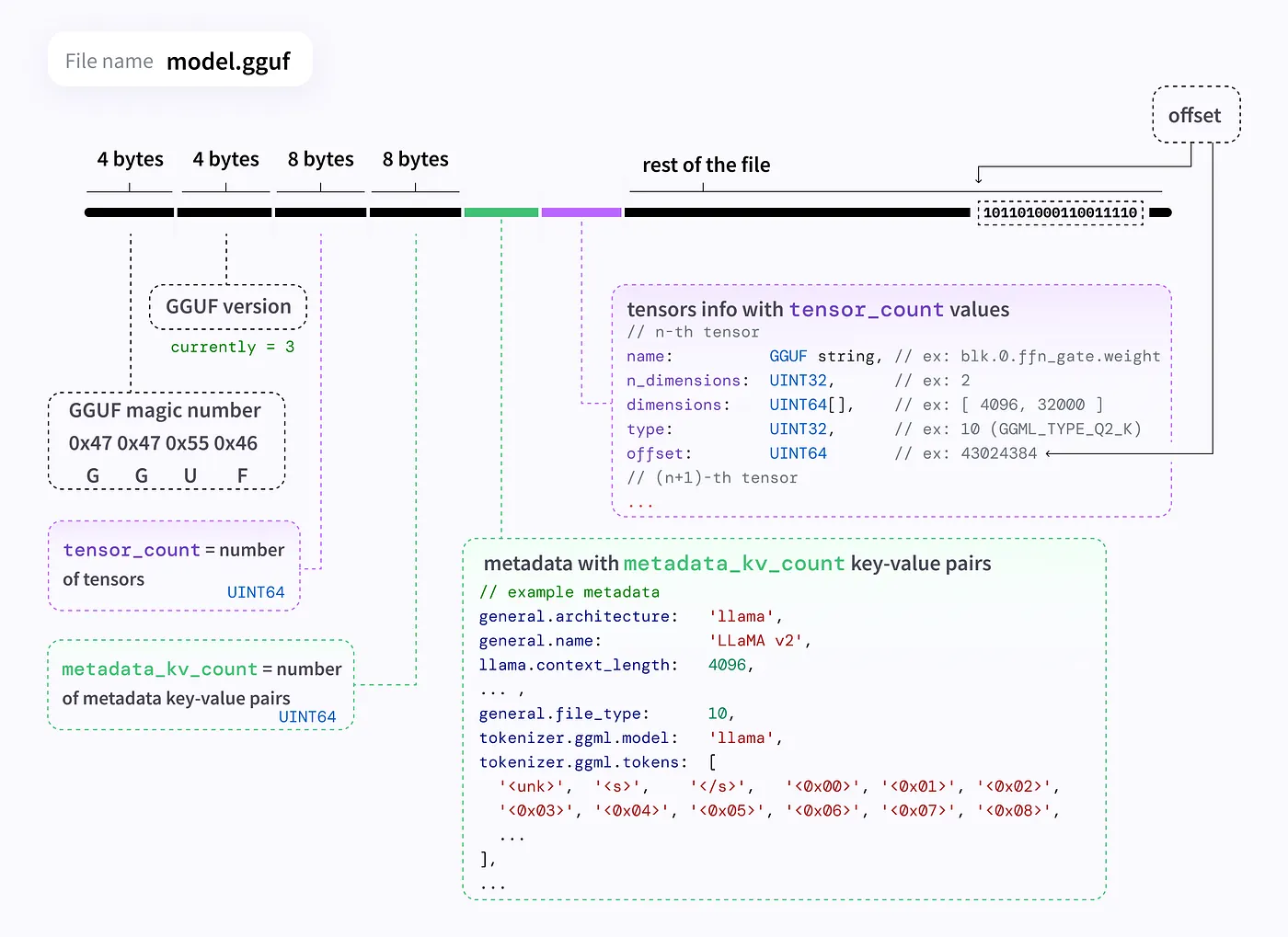
GGUF is the native model format used by llama.cpp.
A GGUF file stores:
- Model weights
- Tokenizer vocabulary
- Architecture configuration
- Metadata
- Quantization information
inside a single portable file.
This simplifies model distribution and improves compatibility across different platforms.
Memory Mapping (mmap)
Instead of loading the entire model into RAM during startup, llama.cpp uses memory mapping (mmap).
Suppose a GGUF model occupies 4 GB.
Traditional loading allocates the entire 4 GB into memory before inference begins.
With mmap, the operating system maps the file into virtual memory and loads only the portions needed for the current computation. Additional pages are fetched automatically on demand.
This results in:
- Faster startup times
- Lower memory overhead
- Fewer unnecessary memory copies
Universal Hardware Acceleration
llama.cpp automatically detects the available hardware backend and selects the most efficient implementation.
NVIDIA CUDA
For NVIDIA GPUs, llama.cpp uses CUDA kernels compiled with nvcc.
It leverages:
- cuBLAS
- Custom low-bit GEMM kernels
- Optimized quantized matrix multiplication
to maximize inference performance.
Apple Metal
On Apple Silicon devices, llama.cpp uses the Metal API and Metal Performance Shaders (MPS).
The compute kernels are written in the Metal Shading Language and execute efficiently using Apple's unified memory architecture, minimizing memory transfer overhead.
Vulkan
For AMD GPUs and many integrated GPUs, llama.cpp supports Vulkan compute.
Vulkan provides a vendor-independent API capable of executing high-performance matrix multiplication across a wide variety of hardware.
SYCL
For Intel hardware, llama.cpp supports SYCL through Intel OneAPI.
This backend enables optimized execution on Intel CPUs and Intel Arc GPUs while maintaining a unified programming model.
LLaMA.cpp vs vLLM
| Feature | LLaMA.cpp | vLLM |
|---|---|---|
| Primary Goal | Minimize resource usage | Maximize token throughput |
| Target Environment | Local and edge devices | Cloud servers |
| Primary Hardware | CPUs, Apple Silicon, single GPU | Enterprise GPU clusters |
| User Load | Single user | Hundreds of concurrent users |
| Programming Stack | C/C++ | Python, PyTorch, Ray |
| Memory Optimization | Quantization (GGUF) | PagedAttention |
| Batching Strategy | Continuous batching | Dynamic continuous batching |
| Distributed Inference | Limited | Tensor parallelism and distributed serving |
When to Use LLaMA.cpp
LLaMA.cpp is an excellent choice for:
- Offline AI assistants
- Edge AI deployment
- Privacy-preserving local inference
- CPU-based execution
- Lightweight applications
- Quantized models running entirely in system RAM
For enterprise-scale serving with many concurrent users, frameworks such as vLLM are generally preferred due to advanced scheduling, PagedAttention, and distributed inference capabilities.